How to retrieve an earlier History version file from an artefact
RedEyeDMS maintains all historical data against the primary, latest version of an artefact, with the Latest activity on top. But what if you need to access an actual file that was submitted as an earlier historical item? Here’s how…
Role Required:
-
Bucket Administrator
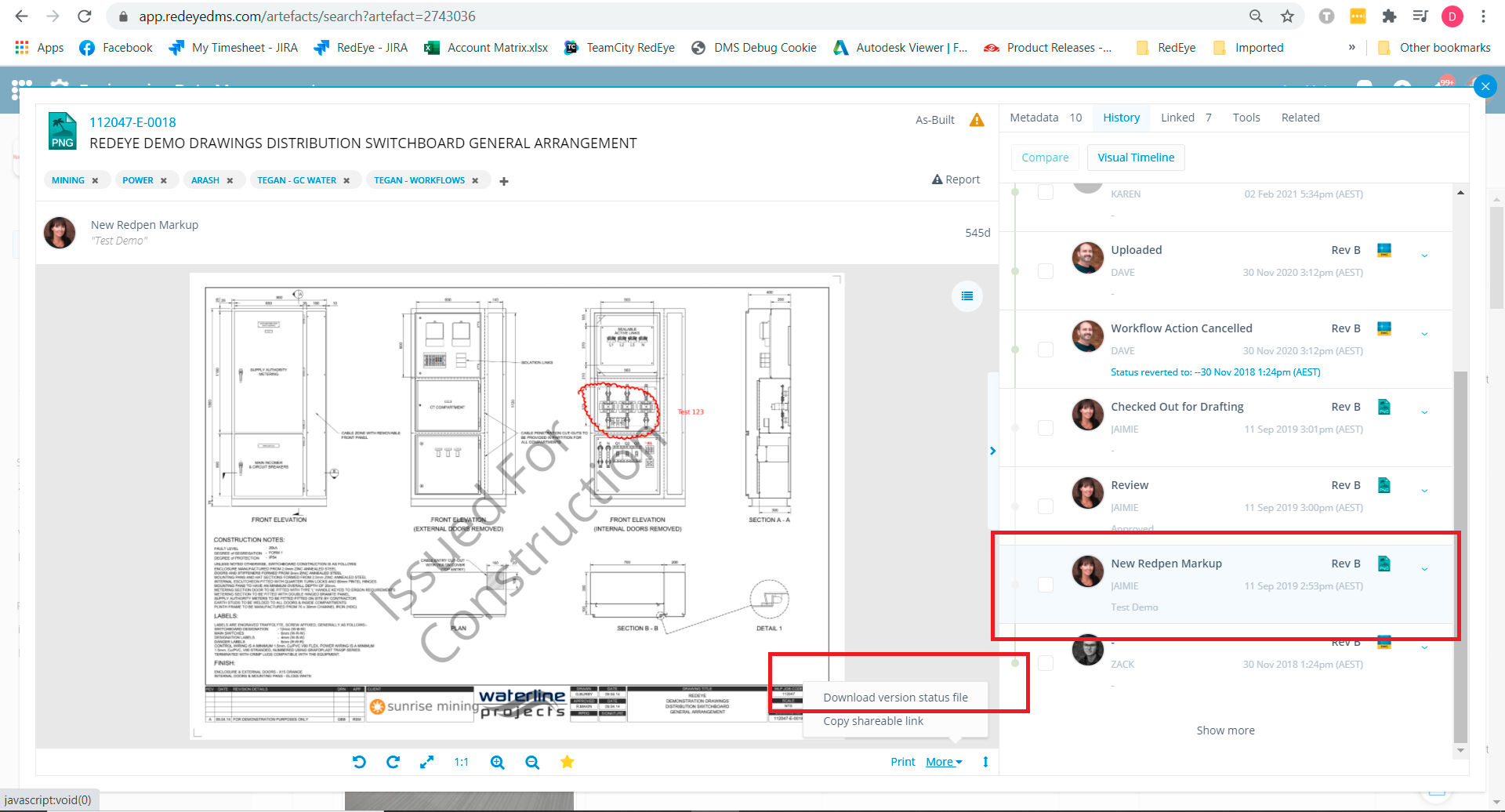
On the artefact page of the artefact in question, click the History entry of the version to view it. Then click (bottom of preview next to Print) More->Download Version Status File to download the version file of that history entry, in the format that it was originally added (eg. DWG, PDF or JPG).
Example
In this example my latest approved is a DWG - However, I want to download the historical markup file so I download the Version Status File once I have selected the New Redpen Markup version entry
Downloaded Version files will NOT have a QR code and hence are to be downloaded, distributed and used with due caution
Example Use Cases:
-
An administrator can use Upload New Markup to re-submit a downloaded redpen from a cancelled workflow
-
An administrator can retrieve a Native format file (eg. DWG) of an earlier revision number than the latest approved revision
-
Workflow intervention - a bug with a workflow has created an incorrect/undesirable outcome and administrator needs to retrieve files so as to initiate the workflow again, after cancelling the problem workflow.